PowerMTA 6.0r3 · Auto Installer

PowerMTA 6.0r3 Auto Installer with ARC, BIMI, DKIM, SPF & DMARC applied to your DNS automatically

The PowerMTA 6.0r3 Auto Installer runs as a single script and installs PowerMTA 6.0r3 from a .deb or .rpm package, asks you for your domains, IPs and rotation, then generates every authentication record your domains need and publishes it to your DNS. Bash and Python installers both included — no config files to hand-edit, no half-configured signing.

Choco Mailer worth $199 bundled free with every purchase

See What Is Included

Pay in Bitcoin, Litecoin, USDT and 7 more coins · Account created at checkout · Installation support included

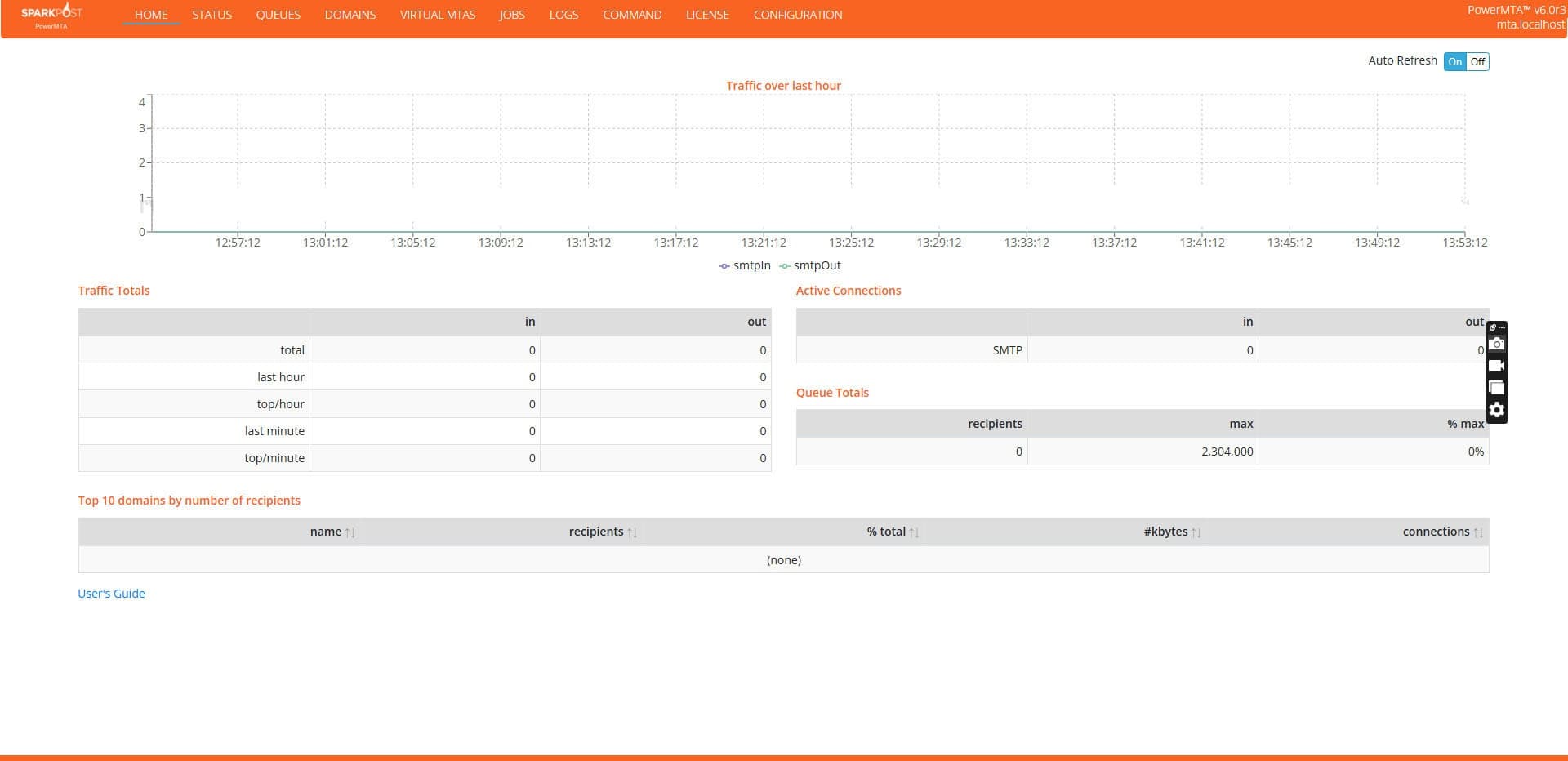
PowerMTA 6.0r3 Auto Installer result — the PowerMTA web monitor dashboard showing traffic over the last hour, traffic totals, active SMTP connections and queue totals
The PowerMTA 6.0r3 web monitor, enabled and secured by the installer
  • v6.0r3
    Latest PowerMTA 6.0 series
  • .deb + .rpm
    Both packages included
  • 5 standards
    SPF · DKIM · DMARC · ARC · BIMI
  • +$199 free
    Choco Mailer bundled

What PowerMTA 6.0r3 gives you

PowerMTA is the commercial MTA that email service providers and high-volume senders run when delivery actually matters. The 6.0 series is the current generation, and 6.0r3 is the release this installer targets.

Built for volume, not for hobby sending

A single PowerMTA instance delivers in parallel across many IP addresses and splits traffic into independent streams called virtual MTAs. Each stream carries its own IPs, its own reputation and its own rate limits, so transactional mail, marketing campaigns and per-customer sending never interfere with each other.

Settings cascade from global to provider, domain, IP and pool level. That is what lets you honour Gmail's limits, Microsoft's limits and Yahoo's limits at the same time from one box — and it is exactly the layer the auto installer pre-configures for you.

Per-message transaction data, automatic back-off and IP warm-up support mean you can see why a message failed and react to it, instead of watching an opaque queue grow.

Capabilities configured for you

  • Virtual MTAs — split traffic into isolated streams, each with its own IPs, reputation and rate limits
  • IP pools with round-robin selection and per-pool sending policies
  • Per-domain and per-provider queue, connection and throttling controls
  • Automatic back-off when a mailbox provider defers or rate-limits
  • DKIM signing with multiple selectors and per-domain keys
  • ARC sealing for forwarded and mailing-list traffic
  • Detailed accounting logs with bounce and complaint categorisation
  • Web monitor dashboard for live queues, traffic totals and top domains
  • SMTP and HTTP submission with pickup-directory injection
  • Feedback loop and DMARC aggregate report handling

Licence included: Your PowerMTA 6.0r3 licence is applied automatically by us during installation and managed by us from there on. Nothing to buy separately and no licence key for you to supply.

SPF, DKIM, DMARC, ARC and BIMI — generated and published for you

Every record below is produced from the configuration the installer just applied. Add a Cloudflare, GoDaddy or Namecheap API key and they are written straight into your zone, with existing records detected and merged rather than duplicated. Prefer to do it yourself? The installer hands you every record at the end for manual entry.

SPF

Sender Policy Framework

Declares which IP addresses are allowed to send mail for your domain. The installer reads the sending IPs it just configured in PowerMTA and writes them straight into your SPF record.

TXT @ v=spf1 ip4:YOUR.SENDING.IP -all
  • Sending IPs and IP pools detected automatically
  • Existing SPF records merged instead of duplicated
  • Stays within the 10 DNS-lookup limit
  • Hard-fail (-all) policy applied by default
DKIM

DomainKeys Identified Mail

Cryptographically signs every outgoing message so mailbox providers can verify the body and headers were not altered in transit. Keys are generated on your server and never leave it.

TXT sel1._domainkey v=DKIM1; k=rsa; p=MIIBIjANBgkq...
  • 2048-bit RSA key pairs generated per domain
  • Selector chosen automatically and wired into pmta.conf
  • Public key published to DNS in one pass
  • Signing verified against a live test send before handover
DMARC

Domain-based Message Authentication

Tells mailbox providers what to do when SPF or DKIM alignment fails, and gives you aggregate reporting on everything sent in your name. Required by Google and Yahoo for bulk senders.

TXT _dmarc v=DMARC1; p=reject; rua=mailto:dmarc@yourdomain.com
  • Policy published with aggregate (rua) reporting enabled
  • Alignment checked for both SPF and DKIM
  • Safe ramp from p=none to p=quarantine to p=reject
  • Subdomain policy (sp=) handled explicitly
ARC

Authenticated Received Chain

ARC preserves the original authentication result when a message is forwarded or passes through a mailing list — the situation where plain SPF and DKIM normally break and legitimate mail starts bouncing.

ARC-Seal · ARC-Message-Signature · ARC-Authentication-Results
  • ARC sealing enabled in the PowerMTA configuration
  • ARC key pair generated alongside your DKIM keys
  • Original SPF, DKIM and DMARC results carried forward
  • Protects forwarded and list traffic from false failures
BIMI

Brand Indicators for Message Identification

BIMI puts your verified logo next to your messages in the inbox. It only takes effect once DMARC is at enforcement, which is exactly the state the installer leaves your domain in.

TXT default._bimi v=BIMI1; l=https://…/logo.svg; a=https://…/vmc.pem
  • BIMI record published with logo and authority URLs
  • SVG Tiny PS logo requirements validated before publishing
  • DMARC enforcement checked first — BIMI is ignored without it
  • Verified Mark Certificate (VMC) reference wired in when supplied

Why ARC and BIMI are the two that matter now

ARC fixes the oldest hole in email authentication: forwarding. When a recipient auto-forwards your message or it passes through a mailing list, the sending IP changes and SPF fails. ARC (RFC 8617) seals the original result into the message so the final destination can still trust it.

BIMI is the reward for getting the rest right. Once DMARC is at p=quarantine or p=reject, a published BIMI record lets mailbox providers show your verified logo next to every message in the inbox.

How this gets you into the inbox

Inbox placement is not a single switch. It is authentication, identity, infrastructure hygiene and rate discipline all pointing the same way. The installer sets up all four before you send your first message.

Full authentication on day one

Google and Yahoo require SPF, DKIM and DMARC from bulk senders. A server that ships with all three aligned — plus ARC and BIMI — starts from a trusted baseline instead of fighting the spam folder.

Correct rDNS and HELO alignment

Forward and reverse DNS, the HELO hostname and the envelope domain are all lined up. Mismatched PTR records are one of the fastest ways to get throttled by large mailbox providers.

A recognisable sender identity

With DMARC at enforcement and BIMI published, your logo can appear beside your messages. Recipients recognise the sender before they read the subject line, which lifts opens and lowers complaints.

Forwarded mail keeps passing

ARC sealing carries the original authentication result through forwarders and mailing lists, so mail that used to fail SPF after a redirect still authenticates at the destination.

Per-provider rate control

Virtual MTAs, IP pools and per-domain queue settings are configured so each mailbox provider is sent to within its own limits, with automatic back-off when a provider pushes back.

Visibility from the first send

The PowerMTA web monitor, accounting logs and bounce categorisation are switched on and secured, so you can see queues, throughput and rejections instead of guessing.

Authentication and configuration get you delivered. Staying in the inbox after that still depends on list quality, sending consistency and engagement — we set the foundation and tell you honestly what you need to keep doing.

Both packages included — .deb and .rpm

Two package formats cover every supported distribution. You get both with your purchase, so moving from Ubuntu to Rocky Linux later does not mean buying again.

.deb

Ubuntu

Installed with dpkg -i or apt install. Uses APT for dependency resolution and systemd for service management.

  • Ubuntu 24.04 LTS (Noble)
  • Ubuntu 22.04 LTS (Jammy)
  • Ubuntu 20.04 LTS (Focal)
.rpm

Red Hat family

Installed with rpm -ivh or dnf install. Uses DNF/YUM for dependency resolution and systemd for service management.

  • Rocky Linux 9 / Rocky Linux 8
  • AlmaLinux 9 / AlmaLinux 8
  • CentOS Stream 9 / CentOS Stream 8 / CentOS 7

64-bit (x86_64) Linux, root or sudo access, and a clean server are recommended. Not sure which family your server belongs to? Run cat /etc/os-release and send us the output.

How the PowerMTA 6.0r3 Auto Installer works

From payment to a verified, inbox-ready sending server.

  1. 01

    Complete your purchase

    Pay the one-time $499 fee in Bitcoin, Litecoin, USDT or any other supported coin. Your account is created at checkout with the email and password you choose.

  2. 02

    Get your installer scripts

    You receive both scripts: a bash installer to run directly on the server, and a Python installer to run remotely from your own machine over SSH. Use whichever suits you.

  3. 03

    Run it and answer the prompts

    The installer asks you everything it needs as it goes — sending domains, IP rotation, virtual MTAs and pools, hostname, and your DNS provider API key if you want records applied for you.

  4. 04

    DNS applied automatically, or handed to you

    Add a Cloudflare, GoDaddy or Namecheap API key and SPF, DKIM, DMARC, ARC and BIMI are written straight to your zone. Skip it and the installer prints every record at the end for manual entry in any DNS panel.

  5. 05

    Verified and ready to send

    PowerMTA 6.0r3 is installed and running with the web monitor up, authentication in place, and a test send to confirm every check passes.

One price, everything included

A single one-time payment. No subscription, no per-domain fee, no monthly renewal.

PowerMTA 6.0r3 Auto Installer

$499/ one-time

Total value $698 — you save $199

Installation · Configuration · Full DNS authentication

🎁 Choco Mailer included free — worth $199

Every installer purchase comes with Choco Mailer bundled at no extra cost. We add it to your account once your payment is confirmed.

  • PowerMTA 6.0r3 automated installation
  • .deb and .rpm packages included
  • Ubuntu, Rocky Linux, AlmaLinux and CentOS support
  • Bash installer script for on-server installation
  • Python installer script for remote installation
  • Guided prompts — nothing to hand-edit in pmta.conf
  • Automatic SPF record generation and publishing
  • Automatic DKIM key generation and publishing
  • Automatic DMARC policy generation and publishing
  • ARC sealing configuration
  • BIMI record setup with SVG logo and VMC reference
  • DNS applied automatically via Cloudflare, GoDaddy or Namecheap
  • Or every record exported for manual DNS entry
  • rDNS / PTR and HELO hostname alignment guidance
  • Domain, virtual MTA, IP pool and IP rotation setup
  • Web monitor dashboard enabled and secured
  • Inbox-focused delivery tuning
  • Choco Mailer bundled free — worth $199
  • One-time payment — no monthly fees
  • Installation support

Pay with cryptocurrency

  • BTC
  • LTC
  • USDT
  • ETH
  • USDC
  • TRX
  • BNB
  • DOGE
  • BCH
  • XMR

Frequently asked questions

Everything buyers ask before ordering the installer.

Is a PowerMTA 6.0r3 licence included in the $499?

Yes. The licence is applied automatically by us during installation and managed by us afterwards. You do not need to buy a licence separately or supply a licence key — the $499 covers the licence, the automated installation, the configuration and the full DNS authentication setup.

Which package do I need, .deb or .rpm?

Use the .deb package on Ubuntu 20.04, 22.04 and 24.04 LTS. Use the .rpm package on Rocky Linux 8/9, AlmaLinux 8/9 and CentOS Stream 8/9 or CentOS 7. Both packages ship with the purchase, so you can move between distribution families later without buying again.

What does ARC actually change for my sending?

ARC keeps your authentication result intact when a message is forwarded or relayed through a mailing list. Without ARC, forwarding rewrites the path and SPF fails, so legitimate mail gets rejected or filed as spam. With ARC sealing enabled, the receiving side can still see that the message passed authentication at the original hop.

Will BIMI show my logo in Gmail straight away?

The installer publishes a valid BIMI record and validates your SVG Tiny PS logo. Displaying the logo is then up to each mailbox provider: Gmail requires DMARC at enforcement plus a Verified Mark Certificate issued by a certification authority. We wire the VMC reference in as soon as you supply one.

Do I have to give you an API key to use this?

No. Adding a Cloudflare, GoDaddy or Namecheap API key is optional and only enables automatic DNS. With a key, the installer detects existing records, avoids duplicates and writes SPF, DKIM, DMARC, ARC and BIMI in one pass. Without a key, it prints every record at the end so you can paste them into any DNS panel yourself.

Do I run the installer myself, or do you need SSH access?

You run it yourself — we never need access to your server. The bash script runs directly on the machine, and the Python script installs remotely over SSH from your own computer. Both are included, and both ask you for the settings they need as they go.

What does the installer ask me during setup?

Your sending domains, hostname, the IPs to use and how you want them rotated, virtual MTA and pool layout, and optionally your DNS provider API key. It configures PowerMTA from your answers — there is no config file to hand-edit.

How long does the installation take?

The install and configuration typically completes in well under an hour on a clean server. DNS propagation adds a short wait before every authentication check goes green.

Is Choco Mailer really included for free?

Yes. Choco Mailer normally sells for $199 and is bundled at no extra cost with every PowerMTA 6.0r3 Auto Installer purchase. You pay $499 once and get both, a combined value of $698. We add Choco Mailer to your account after your payment is confirmed — there is nothing extra to buy or configure at checkout.

Which cryptocurrencies can I pay with?

Bitcoin (BTC), Litecoin (LTC), Tether (USDT), Ethereum (ETH), USD Coin (USDC), TRON (TRX), BNB, Dogecoin (DOGE), Bitcoin Cash (BCH) and Monero (XMR). Payments are processed through Plisio.

Get the PowerMTA 6.0r3 Auto Installer today

Installed, tuned and fully authenticated with SPF, DKIM, DMARC, ARC and BIMI applied to your DNS. One payment of $499, with Choco Mailer worth $199 bundled free.

Questions about your server or domains before buying?

Contact our support team →

Managing DNS across many sending domains? See how PMTAcore automates SPF, DKIM and DMARC.