How I Stopped Wasting Time Installing PowerMTA Manually on Every Server
I used to spend hours setting up PowerMTA on each new server. SSH in, download packages, fix dependencies, configure firewall rules... it was painful. Heres how I finally fixed that workflow.

If you run email infrastructure for a living, you know the drill. You spin up a new VPS, SSH into it, start installing PowerMTA, and then something breaks. Maybe its a dependency issue on AlmaLinux 9, maybe the firewall rules didnt stick, or maybe you just forgot one step in your own notes from last time.
I've been doing this for about 3 years now. At first it was fine — I had maybe 5 servers. But once I started scaling up to 20+ servers across Linode and Vultr, the manual process became a real bottleneck. I was spending entire afternoons just getting PMTA installed and configured on new boxes.
The Problem With Manual Setup
Heres what my old workflow looked like:
- Log into Linode or Vultr dashboard, create a new instance
- Wait for it to boot, copy the IP and root password
- Open PuTTY, connect via SSH
- Run a bunch of commands to update the OS, install dependencies
- Download the PowerMTA package (and hope I remembered which version works with this OS)
- Install it, configure the license, set up the config file
- Open firewall ports
- Test if its actually working
That whole process took me anywhere from 45 minutes to 2 hours per server, depending on what went wrong. And something always went wrong. Wrong PMTA version for the OS, missing library, typo in the config... you name it.
What Changed For Me
A few months ago I found PMTAcore and honestly I was skeptical at first. Another tool claiming to make things easier? Sure. But I tried the free trial anyway because I had nothing to lose.
The first thing I noticed was the cloud manager. I connected my Linode API token and suddenly all my servers showed up right there in the app. No more switching between browser tabs and terminal windows. I could see server status, reboot them, even create new instances without leaving the application.
But the real game changer was the one-click PowerMTA installation. I selected a server, picked PMTA version 5.0r4, hit install, and... it just worked. The app detected that the server was running AlmaLinux 8, installed all the right dependencies, configured the firewall, and set up a basic PMTA config. The whole thing took maybe 10 minutes and I didnt have to type a single command.
My Workflow Now
These days when I need to scale up, I just:
- Open PMTAcore, go to Cloud Manager
- Create a new instance right from the app
- Once its ready, click Install PMTA
- Pick my version and let it do its thing
What used to take 2 hours now takes about 15 minutes. And I havent had a failed installation since I started using it. The app handles all the OS detection and dependency stuff automatically.
I also use the built-in SSH terminal a lot. Before, I had like 30 saved sessions in PuTTY and half of them had outdated passwords. Now all my server connections are in one place and I can jump into any terminal with one click.
The Email Validation Thing
One feature I wasnt expecting to use much was the email validator. But it turns out its really handy. Before sending any campaign I run my list through it and it catches invalid addresses, disposable emails, all that stuff. My bounce rates dropped noticeably after I started doing this consistently.
Is It Worth It?
Look, I'm not going to say its perfect for everyone. If you only manage one or two servers, the manual approach is probably fine. But if youre managing multiple servers across different cloud providers and you install PMTA regularly, the time savings add up fast. I calculated that I was spending roughly 8-10 hours a month just on server setup and maintenance. Now its maybe 2 hours.
The lifetime license is $499 which seemed like a lot at first, but when I thought about it in terms of hours saved per month, it paid for itself in the first month basically. The 1-year plan at $299 is also reasonable if you want to try it for a while first.
Anyway, thats my experience. If youre in the email infrastructure space and tired of the manual grind, its worth checking out the free trial at least. You get 30 days to see if it fits your workflow.
Related Articles

PowerMTA Gmail Bulk Sender Requirements 2026: Compliance Guide
Follow step-by-step PowerMTA configuration, SPF/DKIM/DMARC setup, and DNS changes to meet Google and Yahoo 2026 bulk sender rules. Includes spam-rate limits, unsubscribe, and automated auditing.
Read more →
The Complete PowerMTA Setup Guide for High-Volume Email Sending
Learn how to install, configure, and optimize PowerMTA for high-volume email delivery. This complete guide covers DNS authentication, VirtualMTAs, IP warm-up, deliverability best practices, and scaling your email infrastructure.
Read more →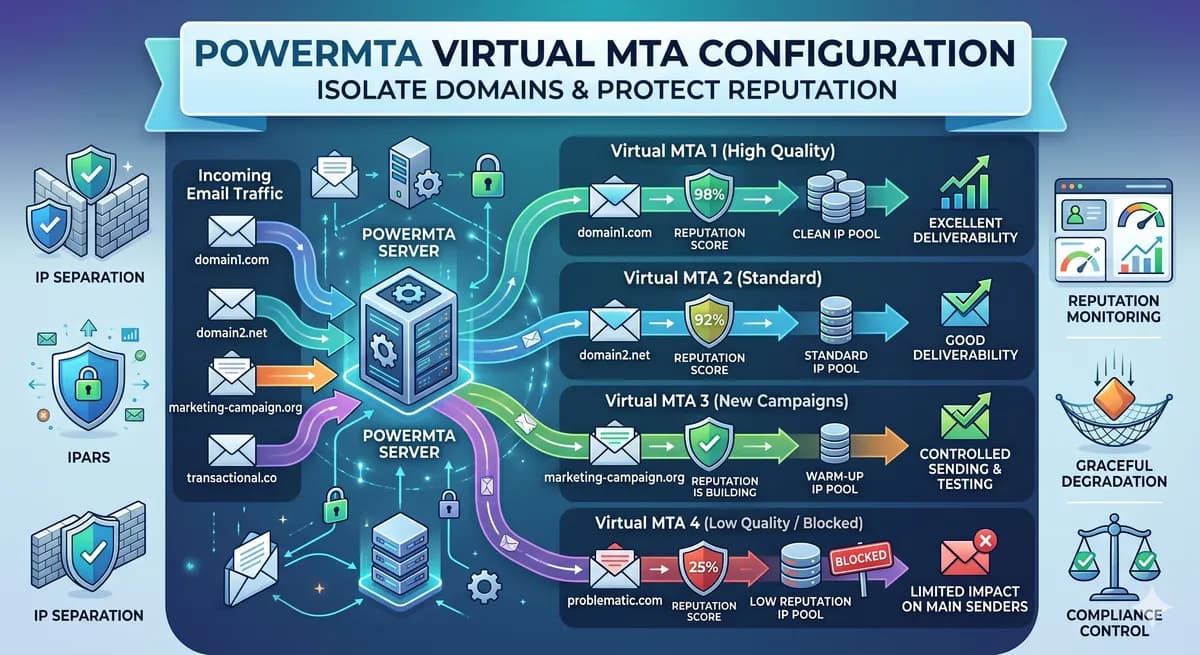
PowerMTA Virtual MTA Configuration – Isolate Domains & Protect Reputation
Using a single PowerMTA config for all domains is a critical mistake. Learn how to configure Virtual MTAs to isolate sending reputation, separate transactional from marketing mail, and prevent one bad domain from killing all your IPs.
Read more →