Man, PMTAcore Completely Changed How I Handle PowerMTA in 2026 – My Honest Review
Setting up PowerMTA manually was killing my time every single server. Then I tried PMTAcore desktop app and everything got so much easier. Full honest review: one-click install, email validator, DNS management, blacklist checker – how it saves hours and boosts deliverability. Must-read if you use Po
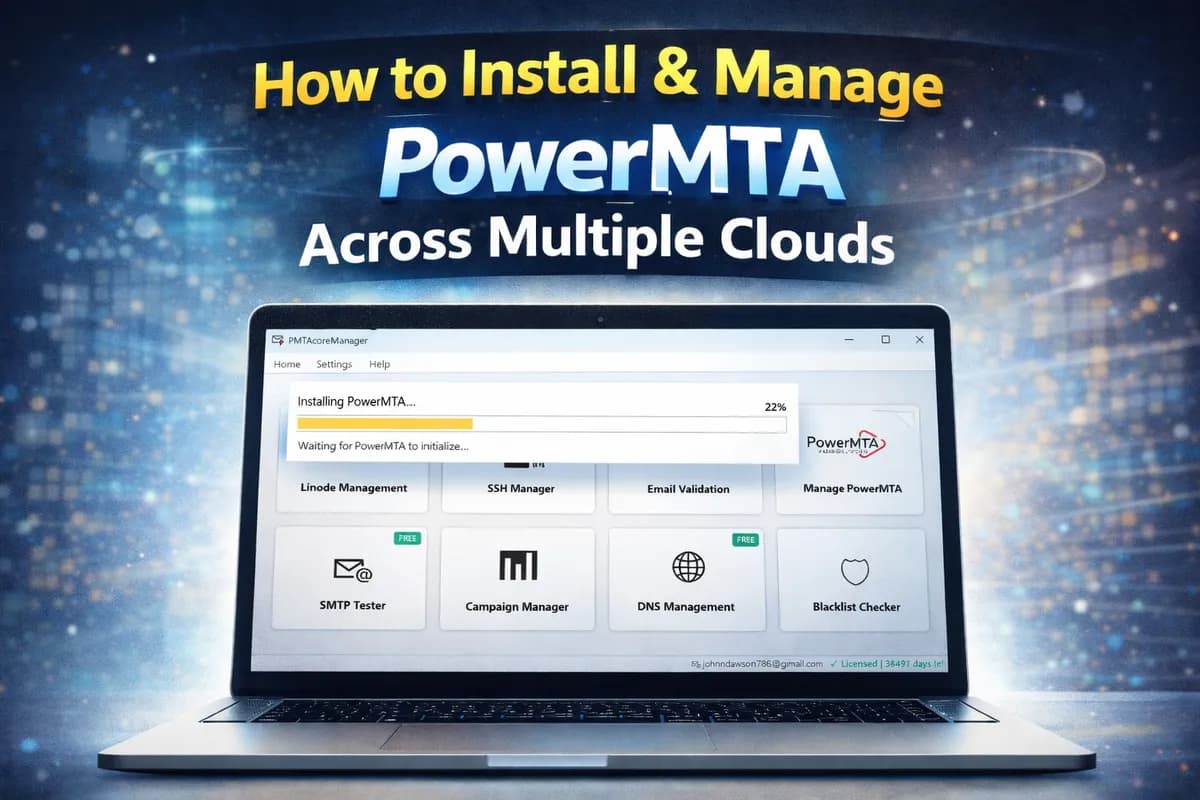
Man, Let Me Start with My Own Mess...
You know how it is – if you're running bulk email campaigns or managing cold outreach, PowerMTA is still one of the strongest tools out there in 2026. Great control, high volume, solid deliverability when done right. But the setup? Seriously painful.
Every new server (Vultr, Linode, DigitalOcean, whatever), I'd spend half a day or more: SSH in, update packages, install dependencies, paste license key carefully, edit config files, set firewall, fix rDNS, add SPF/DKIM records manually... and half the time something breaks – service won't start, license signature invalid, or bounces skyrocket because of bad setup. It was wasting so much time and stressing me out. I bet many of you have been there.
Then I came across PMTAcore – a Windows desktop app built specifically for this. I was skeptical at first ("another tool?"), but after using it for a couple months, trust me, it changed everything. No more terminal chaos. Here's the full honest breakdown of why it's worth it.
What PMTAcore Actually Is
It's a simple Windows application that runs locally on your machine. Your SSH keys, API tokens, server details – everything stays on your computer, no cloud nonsense or security risks. No monthly subscription if you go lifetime. Pay once, get updates for the plan duration.
Supports AlmaLinux 8/9 and Rocky Linux 8/9 perfectly (the best modern options for PowerMTA servers). Handles PowerMTA versions 4.5r1 up to the latest 6.0r3. Works with major clouds (Linode/Akamai, DigitalOcean, Vultr, AWS) and custom servers. Integrates DNS from Cloudflare, GoDaddy, Namecheap. If you're managing even 3-4 servers, this is made for you.
One-Click PowerMTA Install – This Alone Saved Me Days
Before: Hours of manual commands, fixing errors like missing perl/gdb, firewall blocks, config typos.
Now: Connect SSH to your server in the app, select AlmaLinux/Rocky, pick your PMTA version, hit install. It auto-installs dependencies, sets firewall rules (opens port 25 properly), applies basic configs, starts the service. Even catches common issues like PID file problems or license paste errors.
I set up 5 servers last month in under 20 minutes each. Zero failures. What used to be a full-day headache is now coffee-break easy. Huge time-saver for anyone spinning up servers often.
Multi-Cloud Server Manager – One Place for All Your Servers
I used to juggle browser tabs for each provider + Putty terminals. Nightmare.
PMTAcore lets you add API keys once (Linode, DO, Vultr, AWS), then launch instances, power on/off, reboot, delete servers – right from the desktop. Unlimited servers in paid plans. I manage everything without switching apps. Super convenient if you scale across providers.
DNS Management – Auto-Setup SPF, DKIM, DMARC, rDNS
This feature is gold. Connect your DNS provider API (Cloudflare is seamless, GoDaddy/Namecheap work too). During install, it fetches your domains and applies records in one click: SPF, DKIM selectors, DMARC policy, reverse DNS pointers.
No more logging into different panels and forgetting something. My authentication scores are perfect now, and deliverability jumped because basics are always correct. Earlier mistakes like missing rDNS killed my inbox rates – not anymore.
Bulk Email Validator – Clean Your Lists Before Disaster
Dirty lists = bounces = blacklists = ruined IP reputation. I used separate paid validators before.
PMTAcore has unlimited bulk validation in paid tiers: Upload lists, it checks MX records, SMTP connect, disposable/temporary emails. Exports valid/invalid CSV. Free trial gives 100/day to test. This alone prevented tons of complaints and kept my sender score high. Inbox placement improved noticeably.
Other Features That Make Life Easier
- SMTP Tester: Quick test sends to check auth, delivery to Gmail/Yahoo – see if it hits inbox or spam.
- Campaign Manager: Upload recipients, templates, send/track bulk campaigns right in the app. No need for extra software.
- IP Blacklist Checker: Scans your IPs against 50+ lists (Spamhaus, etc.), gives delist steps. One-click daily checks – prevents surprises.
- SSH Manager: Saved connections + built-in terminal. No more external Putty.
All local, secure, and fast on Windows. Lifetime updates in the $499 plan, priority support via tickets/Telegram.
Pricing – Straightforward, No BS
Free Trial: Limited PowerMTA tools + validator/SMTP tester – test everything.
6 Months: $199 – Good for short projects.
1 Year: $299 – Best value for regular use.
Lifetime: $499 one-time – My pick; forever access + early features.
Before vs After Using PMTAcore
Before: 4+ hours per server, multiple tools/tabs, higher bounces from setup mistakes, constant stress.
After: 10-15 min setups, one app for install/cloud/DNS/validation/campaigns, cleaner lists, better reputation, more time for actual business.
Trust me, if you're still doing everything manually in 2026, you're leaving money on the table. PMTAcore turns PowerMTA from "powerful but painful" to "powerful and smooth".
Bottom Line – Just Try It
Download the free trial today and connect one test server. You'll see the difference in minutes. If it doesn't click, no loss. But for most PowerMTA users, it becomes essential fast.
Download: Get PMTAcore Free Trial
Docs: Full Documentation
Support: Open a ticket or hit Telegram if stuck.
PowerMTA is great – PMTAcore makes it actually enjoyable to use. Stop struggling, start scaling smarter.
Author: PMTAcore Team
Related Articles

The Complete PowerMTA Setup Guide for High-Volume Email Sending
Learn how to install, configure, and optimize PowerMTA for high-volume email delivery. This complete guide covers DNS authentication, VirtualMTAs, IP warm-up, deliverability best practices, and scaling your email infrastructure.
Read more →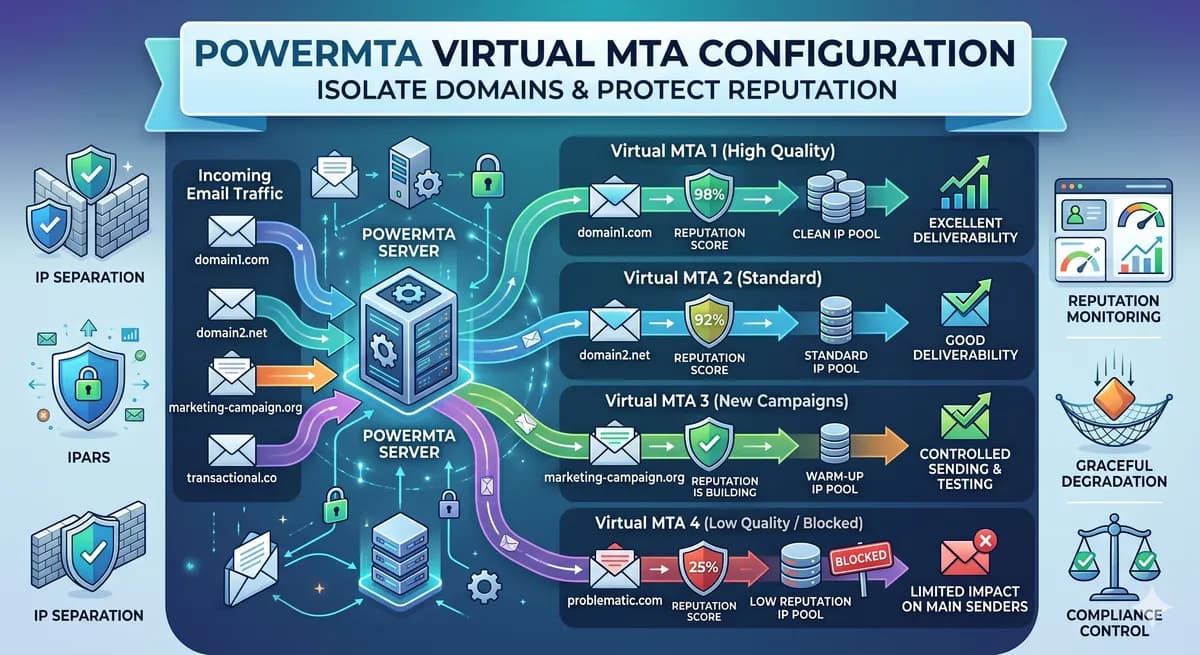
PowerMTA Virtual MTA Configuration – Isolate Domains & Protect Reputation
Using a single PowerMTA config for all domains is a critical mistake. Learn how to configure Virtual MTAs to isolate sending reputation, separate transactional from marketing mail, and prevent one bad domain from killing all your IPs.
Read more →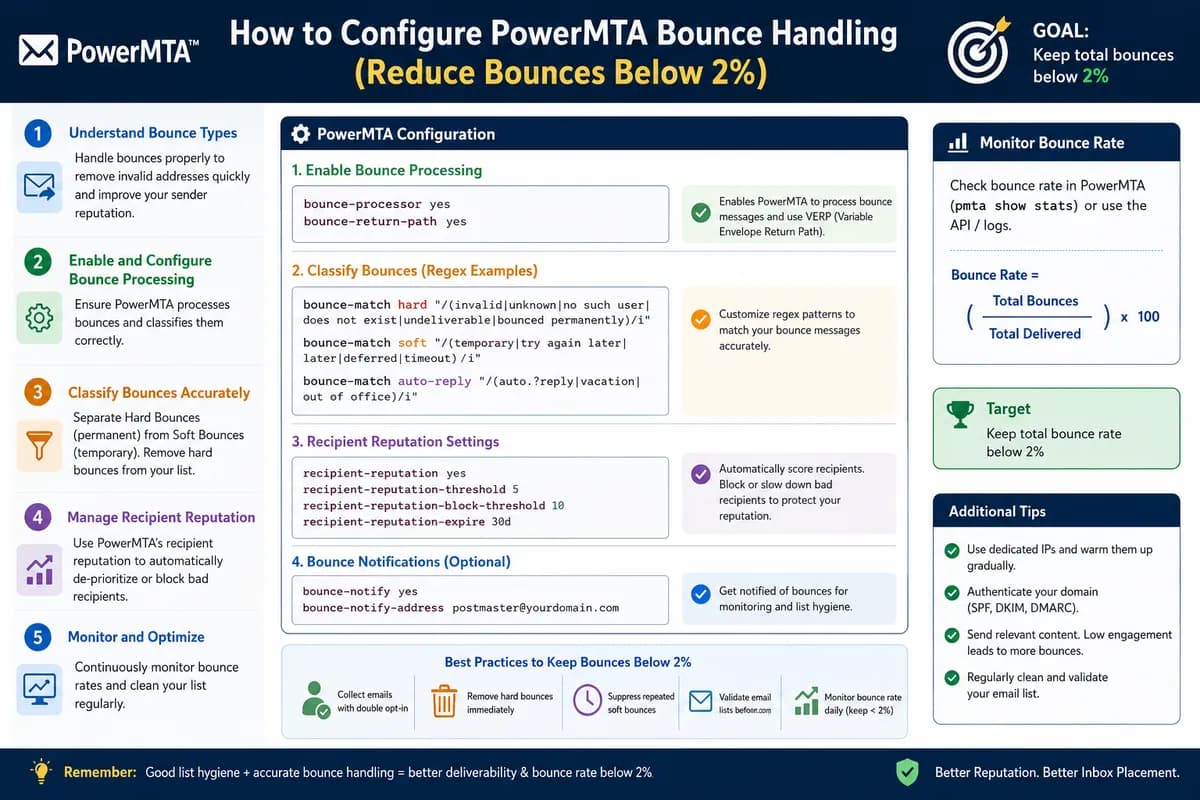
How to Configure PowerMTA Bounce Handling (Reduce Bounces Below 2%)
Gmail, Yahoo, and Microsoft now require bounce rates under 2%. This guide shows you how to configure PowerMTA's bounce processing, automate suppression, and keep your sender reputation clean.
Read more →